Vite Dependency Discovery Bug in Angular: Why Your App Randomly Crashes and How to Fix It
A Vite dep-discovery bug, a wrong first diagnosis, and the one config line that fixed it.
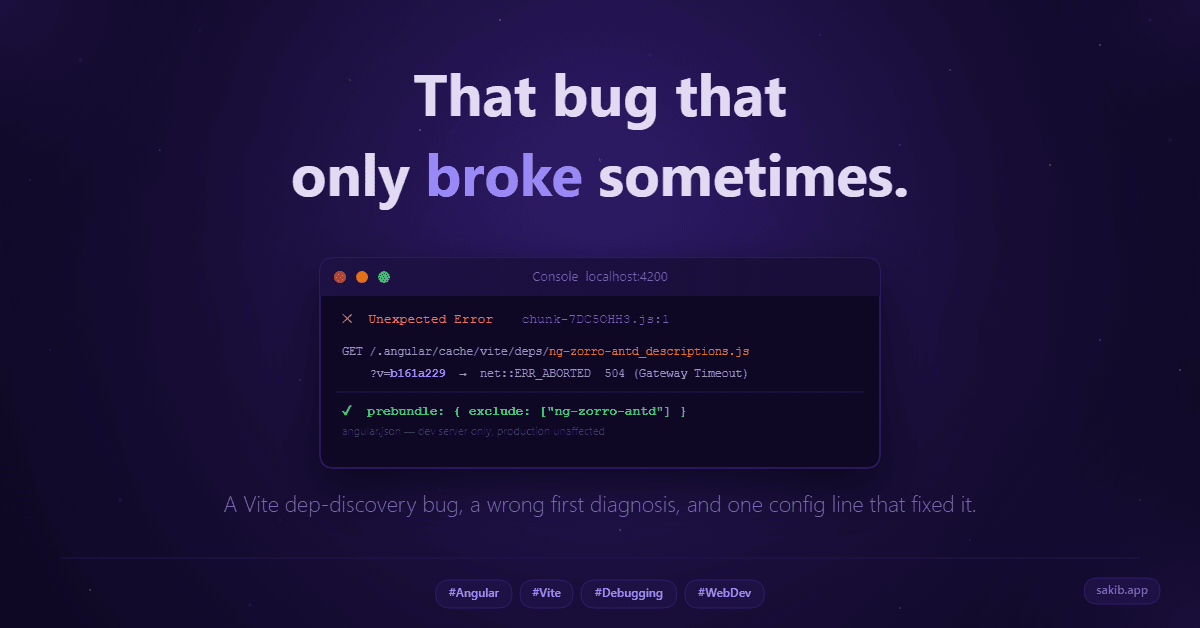
End of day. I was doing a final round of testing before calling it. Clicked My Profile from the navbar dropdown and got this:
Unexpected Error. Failed to fetch dynamically imported module.
Refreshed. Worked fine. Clicked again. Broke again. Restarted the dev server. Worked perfectly. Zero errors.
That kind of bug is the worst kind. Not the ones that always fail. The ones that fail sometimes, for no pattern you can see, and then just go away on their own.
I tried a couple of patches. Nothing worked. So I closed my laptop and went home. Fresh eyes tomorrow. That is one habit I am glad I have built.
The Wrong Diagnosis
First thing next morning, I opened the console and actually read it.
The error mentioned ng-icons. My brain immediately went: okay, this is definitely an ng-icons problem. The icon loader in app.config.ts must be doing something wrong. Probably re-fetching the module on every render instead of caching it. Logical theory.
I changed the provideNgIconLoader setup, moved the dynamic import outside the callback so the module reference resolves once. It felt right.
It did not fix anything.
So I went back and read the full console output this time, every line. And that is when I saw this:
GET https://localhost:4200/@fs/.../.angular/cache/21.2.8/some-project/vite/deps/ng-zorro-antd_descriptions.js?v=b161a229
net::ERR_ABORTED 504 (Gateway Timeout)
That ?v=b161a229 stopped me cold.
That is not something I wrote. That is not my app's hash. That is Vite. And the 504 meant the dev server itself was going down temporarily mid-session. This was not an ng-icons problem. This was not even really an Angular problem.
This was Vite.
But It Was Working Fine Before
Here is the part that kept nagging me. This bug did not exist a week ago. I had been running this app for weeks with zero issues. Then I implemented lang-based routing, /en/dashboard and /bn/dashboard instead of just /dashboard, and suddenly this started randomly breaking.
What does adding a language prefix to routes have to do with Vite crashing?
Everything, as it turns out.
What Vite Actually Does at Startup
Most Angular developers use Vite because Angular uses it. You run npm start, the dev server comes up fast, you move on. Nobody questions it.
Here is what it is actually doing behind the scenes.
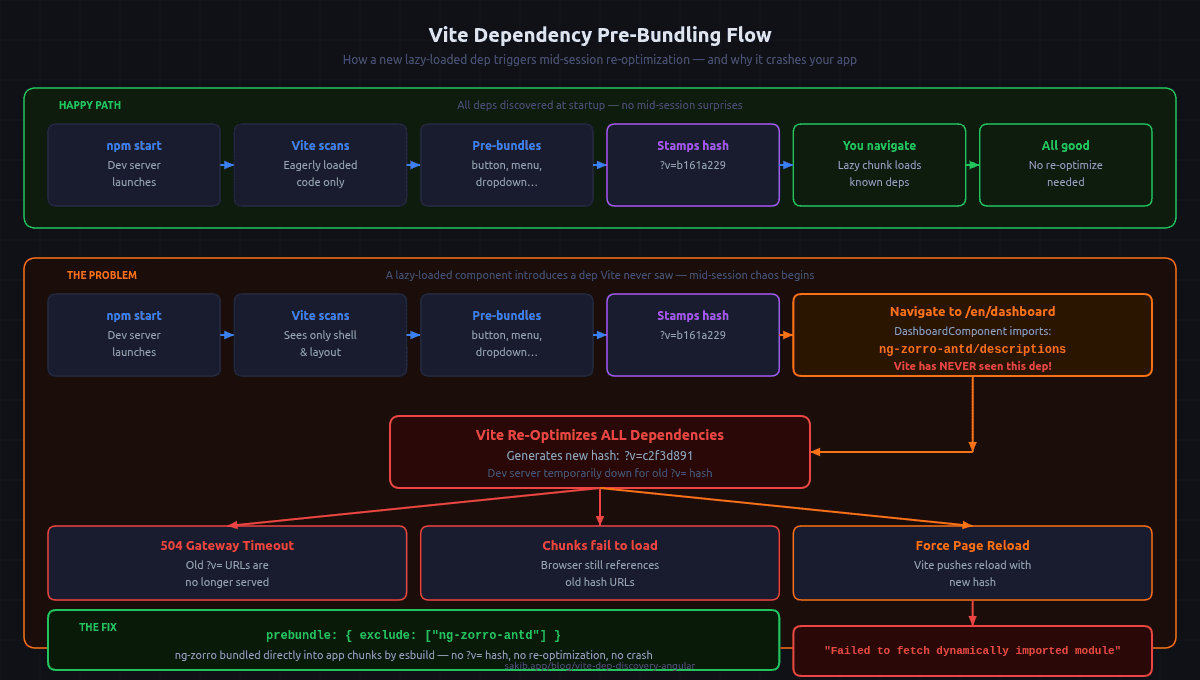
When the dev server starts, Vite scans the code that loads on the first render and pre-bundles all the third-party packages it finds. It takes ng-zorro-antd/button, ng-zorro-antd/menu, ng-zorro-antd/dropdown and compiles each one into a single optimized file inside .angular/cache/.../vite/deps/. It then stamps every file with a version hash, like ?v=b161a229. Every import in your app gets rewritten to point to these cached, versioned files.
This is smart. It makes the dev server fast because third-party packages get processed once and served instantly on every subsequent request.
The problem is what happens when Vite discovers a package it never saw at startup.
The Late Discovery Problem
Angular lazy-loads your feature components. Not everything loads at startup. Features load the first time you navigate to them.
Here is the exact sequence of what was happening in my app:
Step 1. Dev server starts. Vite scans the eagerly-loaded code: the shell, layout component, navbar, sidebar. It finds ng-zorro-antd/button, ng-zorro-antd/menu, ng-zorro-antd/dropdown, ng-zorro-antd/layout. Pre-bundles all of them. Stamps ?v=b161a229.
Step 2. I navigate to /en/dashboard. Angular lazy-loads DashboardComponent for the first time. That component imports ng-zorro-antd/descriptions and ng-zorro-antd/tag. Vite has never seen either of these.
Step 3. Vite has to re-optimize. It pulls in the new packages, recompiles everything, generates a new hash: ?v=c2f3d891. During this window, the dev server is temporarily unavailable for anything using the old hash.
Step 4. But the browser is still running the old session. The lazy chunks Angular already fetched still reference the old ?v=b161a229 URLs. Those 504. The chunks fail to load. The error appears.
Step 5. Vite finishes re-optimizing and forces a full page reload. Everything works again under the new hash. Until the next unseen lazy route fires the same cycle.
This is why the error was non-deterministic. It only happened the first time you visited a route that introduced a new ng-zorro subpackage. After cycling through every route once, Vite had seen everything and stopped re-optimizing mid-session. Which also explains why restarting the server fixed it temporarily.
So Why Did It Work Before the Lang Routing?
This is the part that actually made it click for me.
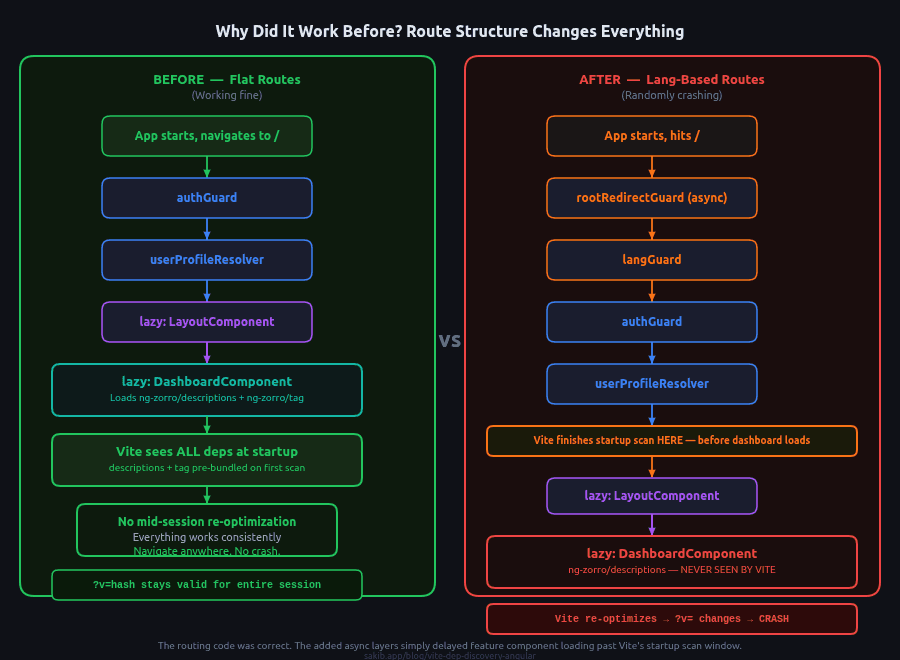
Before the lang routing change, the route structure was flat:
/             -> authGuard -> resolve userProfile -> LayoutComponent
/dashboard    -> DashboardComponent
/my-profile   -> MyProfileComponent
/settings     -> SettingsComponent
When the app started, Angular navigated immediately to /dashboard. The DashboardComponent was lazy-loaded during the very first navigation, fast enough that Vite caught it during its startup scan. ng-zorro-antd/descriptions and ng-zorro-antd/tag got pre-bundled at startup. No mid-session discovery. No crash.
After the lang routing change, reaching the dashboard became:
/                -> rootRedirectGuard (async, checks OAuth token)
/:lang           -> langGuard -> authGuard -> resolve userProfile -> load layout.routes
/:lang/dashboard -> DashboardComponent
Now getting to the dashboard requires chaining through an async redirect guard, a lang guard, an auth guard, a resolver, lazy loading layout.routes, lazy loading LayoutComponent, and only then lazy loading DashboardComponent.
All of that takes time. Vite finishes its startup scan long before the dashboard ever loads. So ng-zorro-antd/descriptions is invisible at startup. When you navigate there later, Vite sees it for the first time, re-optimization fires, and everything breaks.
The lang routing was not wrong. It was actually the right architecture. It just introduced enough async depth that Vite's startup scan completed before the feature components could register themselves. A timing problem, not a code problem.
The Fix
Angular's dev server builder exposes a prebundle option on each serve configuration in angular.json. Setting exclude tells Vite: skip pre-bundling this package entirely, let esbuild bundle it directly into the application chunks instead.
"serve": {
  "configurations": {
    "local": {
      "buildTarget": "some-project:build:local",
      "prebundle": {
        "exclude": ["ng-zorro-antd"]
      }
    }
  }
}
Specifying ng-zorro-antd covers all subpaths automatically. ng-zorro-antd/button, ng-zorro-antd/descriptions, ng-zorro-antd/tag, all 24 subpackages. None of them go through Vite's pre-bundling. None of them get a ?v= hash. None of them can trigger a re-optimization mid-session.
Production builds are completely unaffected. ng build uses esbuild directly with no Vite dev server involved. The prebundle option is a dev-server-only concern.
What I Actually Took From This
I have been using Vite for a while now. Not because I chose it. Because Angular ships with it in dev mode and it just works. I never once questioned what it was doing.
This bug forced me to actually understand it. And that understanding is not just useful for this one fix. It changed how I think about the tools I use every day without thinking about them.
The part that I keep coming back to: the code that caused this bug was correct code. The lang-based routing was the right architecture decision. It was not a mistake. It just exposed a default behavior I had never understood.
Most bugs are like that. They do not come from doing something wrong. They come from not knowing what the tools are doing while you do something right.
I was debugging this with Claude, and the first diagnosis it gave me was also wrong. It pointed at the ng-icons loader too. But pushing past that, going back to the raw console output, reading the actual URLs instead of just the error messages, that is what led to the real answer. Using AI for debugging is not about getting the right answer instantly. It is about having something to think out loud with while you keep digging.
Quick Summary for People Who Just Want the Fix
Vite pre-bundles your third-party packages at dev server startup. If a lazy-loaded component introduces a package Vite has not seen yet, it re-optimizes mid-session, changes all the ?v= hashes, and your in-flight chunks 404.
If you are using Angular with ng-zorro-antd and seeing random "Failed to fetch dynamically imported module" errors in dev that disappear on server restart, this is almost certainly what is happening.
Add this to every local serve configuration in angular.json:
"prebundle": {
  "exclude": ["ng-zorro-antd"]
}
The bug will stop.
Tagged